

More of your market in one place, and less to maintain
Bluefield Software is the most complete farmers market management software, built with care and simple to run. Applications, the map, the season, permits, invoices, the books and your vendors’ portal, in one system where the parts know about each other. Every part is properly engineered and built to last.
What needs you today, and what is about to
The first screen you open, and most mornings the only one you need: the next market day and who is expected, everything outstanding grouped by how urgent it is, and what you are owed. It is always up to date, because it is worked out from your applications, documents and invoices as they stand, not updated by hand.
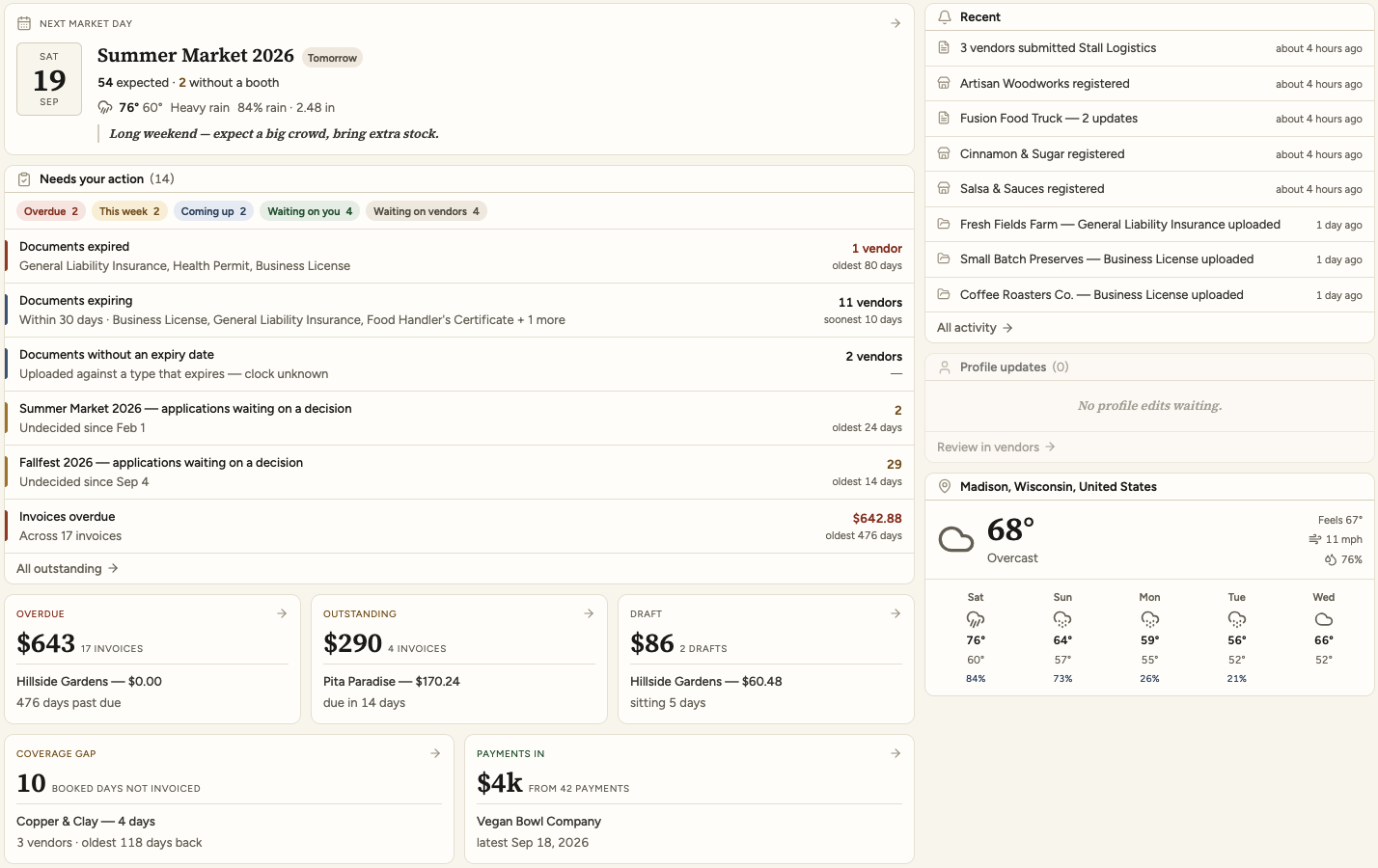
Overdue, this week, coming up, waiting on you, waiting on vendors. An expiring permit and an undecided application sit in the same list, because they are both Saturday’s problem.
Every count is worked out from the documents, applications and invoices as they stand, each time you open it. There is no status field to forget and no list that quietly goes stale.
Who is expected, who is still without a booth, your note to everyone, and what the forecast is about to do to the morning.
Overdue, outstanding and draft, each with what it adds up to, and the booked days that have not reached an invoice yet.
Place the whole season, not one Saturday at a time
The map, the roster and every operating day of the season on one screen. Drag a vendor into a booth and the twenty-one days they committed to are already there, and everything you need in order to decide is in the same row.
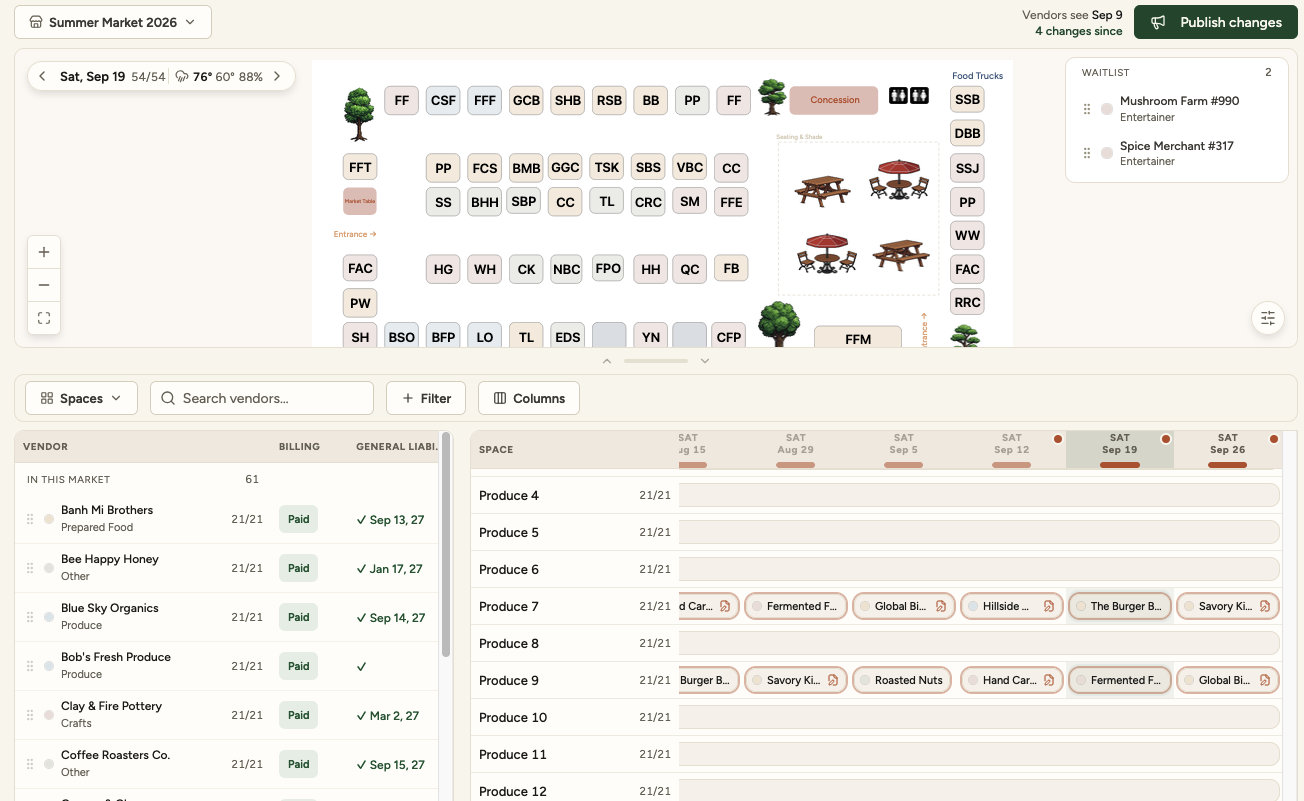
Place a vendor by dragging them into a booth, or move them between spaces on any day of the season. The roster’s own columns reorder by dragging too, so the screen ends up in the order you think in.
The schedule runs across the season’s operating days. A vendor who is in for twenty-one Saturdays and away for one is one row and one exception, not twenty-one decisions.
What they owe, whether their documents are current and when they run out, the answers they gave on their application, your notes about them. Add the columns you want and sort by any of them.
Somebody drops out on the Friday and filling the gap is a drag. You move people around all week as a draft, and vendors see it when you publish.
Draw the site you actually run
Booths, rows, zones, the entrance, the paths, the tree. Name the zones the way you say them out loud, and the roster groups by them afterwards.
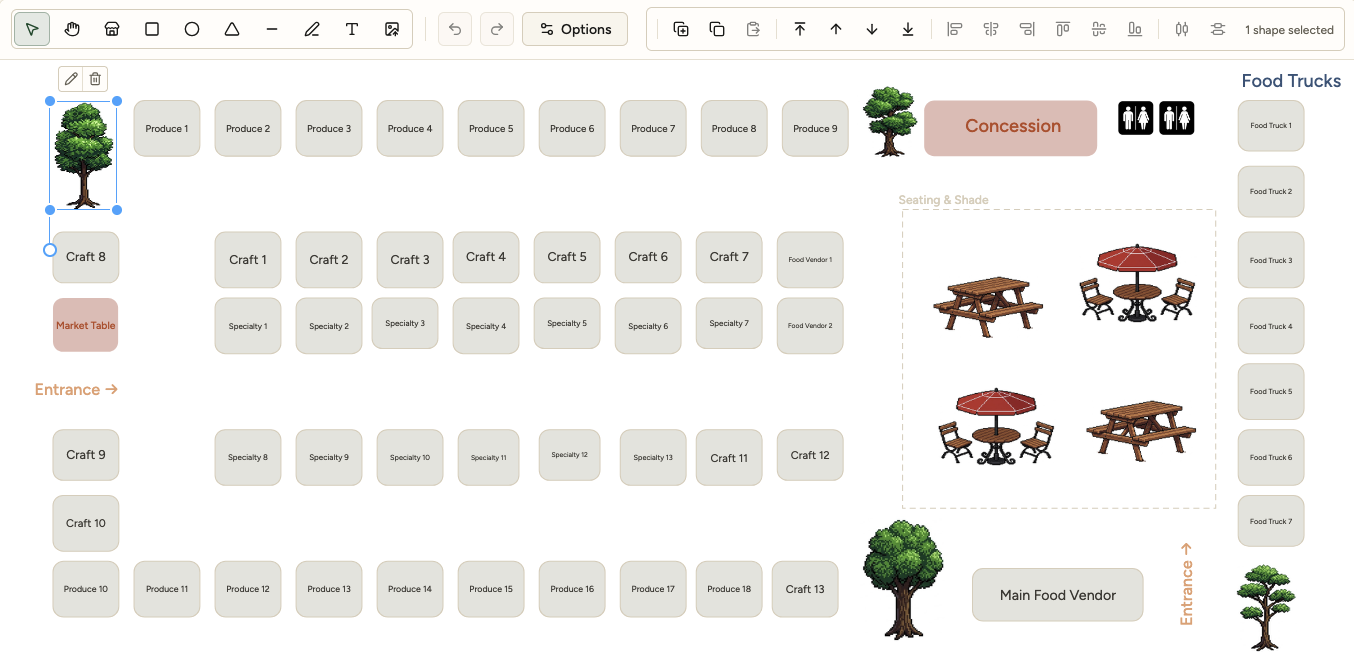
A street closure, an L-shaped car park, a park with a bandstand in the middle. Booths go where you put them.
Trees, seating, the toilets, the concession, the entrance the trucks come through. The map is worth having because it looks like the place.
Booths come in rows and the numbering follows, so a fifty-four booth site is an afternoon rather than a project.
Free text, arrows and images go on the drawing. “Entrance” points at the entrance, and the shade is where the shade is.
Build the form, send it, decide who is in
Write the application the way you ask it out loud, and the answers become the tags you search your directory by later. Edit a live form without losing the answers you already have.
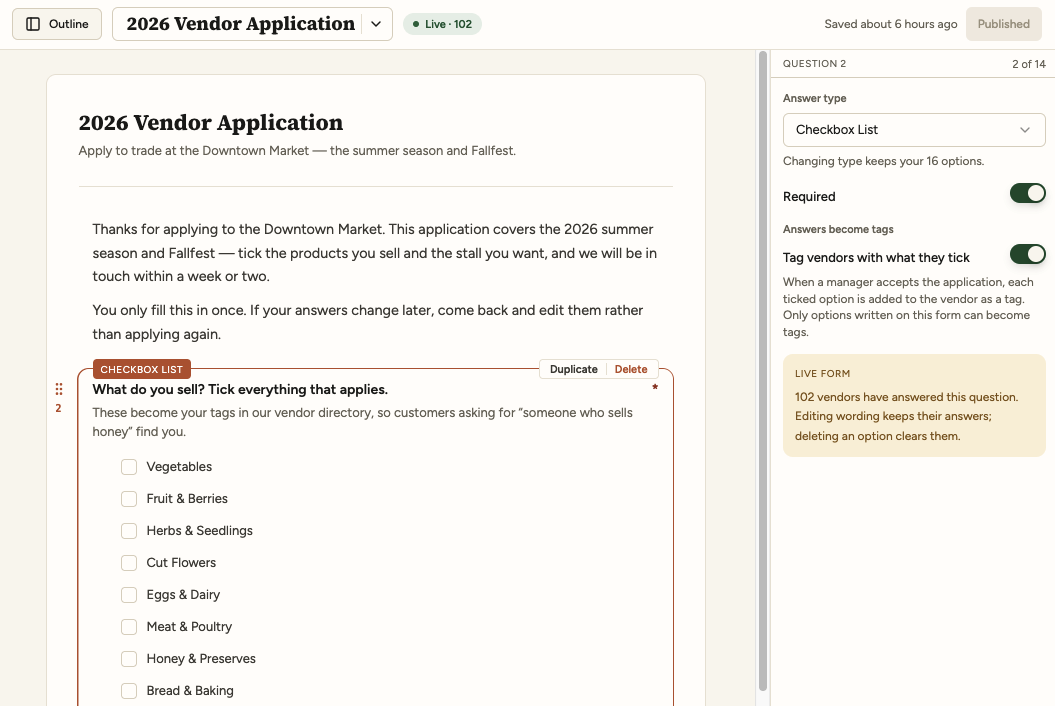
A submission is a stack of revisions. Reword a question with a hundred answers already in and the answers stay attached to it.
You edit a draft. Vendors see the published version. Nothing you are still thinking about reaches anybody.
The Saturday market and the fall fair ask different questions, take different documents and keep separate answers.
Accepted, waitlisted, declined, and the applications still waiting on you, counted on the home screen where you will see them.
An inspector’s question has an answer
Every permit and certificate on file against the vendor it belongs to, with its expiry date watched. Vendors upload their own renewals, so the folder is never yours to chase.

The actual certificate, on file, openable. A checkbox saying somebody saw it in April proves nothing.
Expired, expiring within thirty days, and uploaded against a type that expires with no date given, each its own list.
A market says what it requires. Who is short of something is a list you can work down before Saturday.
The renewal goes straight onto their file from their portal. Chasing certificates stops being the manager’s job.
Bill for exactly what happened, and send it
The days a vendor committed to become the line items, with your own fees beside them and your taxes applied line by line. What they will receive sits on the right of the screen while you edit the left, carrying your logo, your colour and your own payment instructions.
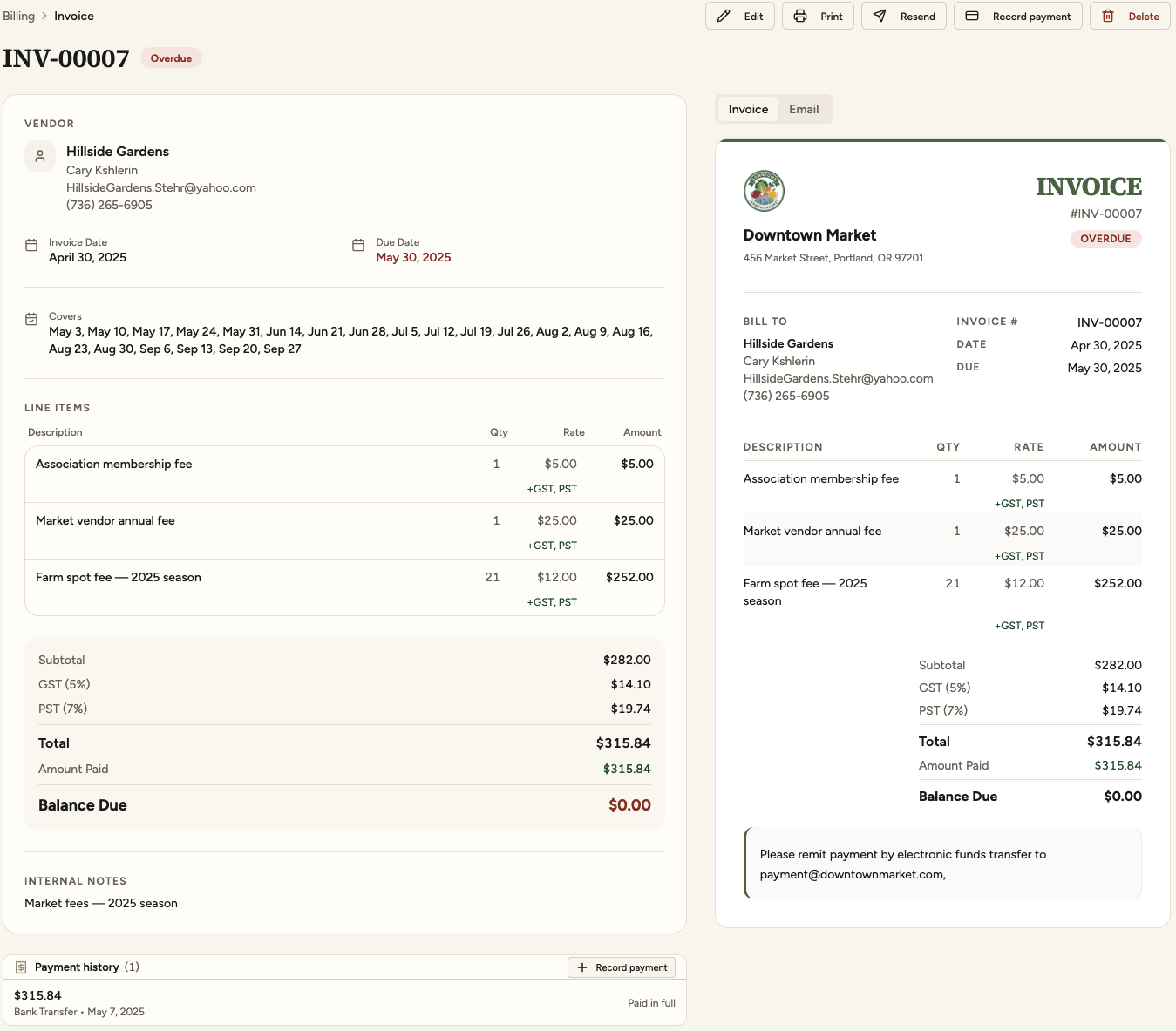
The booked days come across on their own. An association membership, a table rental or a late fee goes on beside them, at whatever rate and quantity you set.
GST on one line and not on another, at the rates your province or state actually charges. The totals come out right without a calculator beside the keyboard.
The preview beside the form is the document the vendor receives: your logo, your colour and the payment instructions in your own words. Print it, or email it and resend it later from the same screen.
Mark what came in, by cheque, transfer or cash, and the balance due follows. The payment history sits under the invoice, so “didn’t she pay in May?” is answered on the page.
Nothing goes uninvoiced, and the books close
Every booked day is on an invoice or visibly is not, vendor by vendor. What is overdue, what is outstanding and for how long, and a set of books your bookkeeper does not have to rebuild in January.
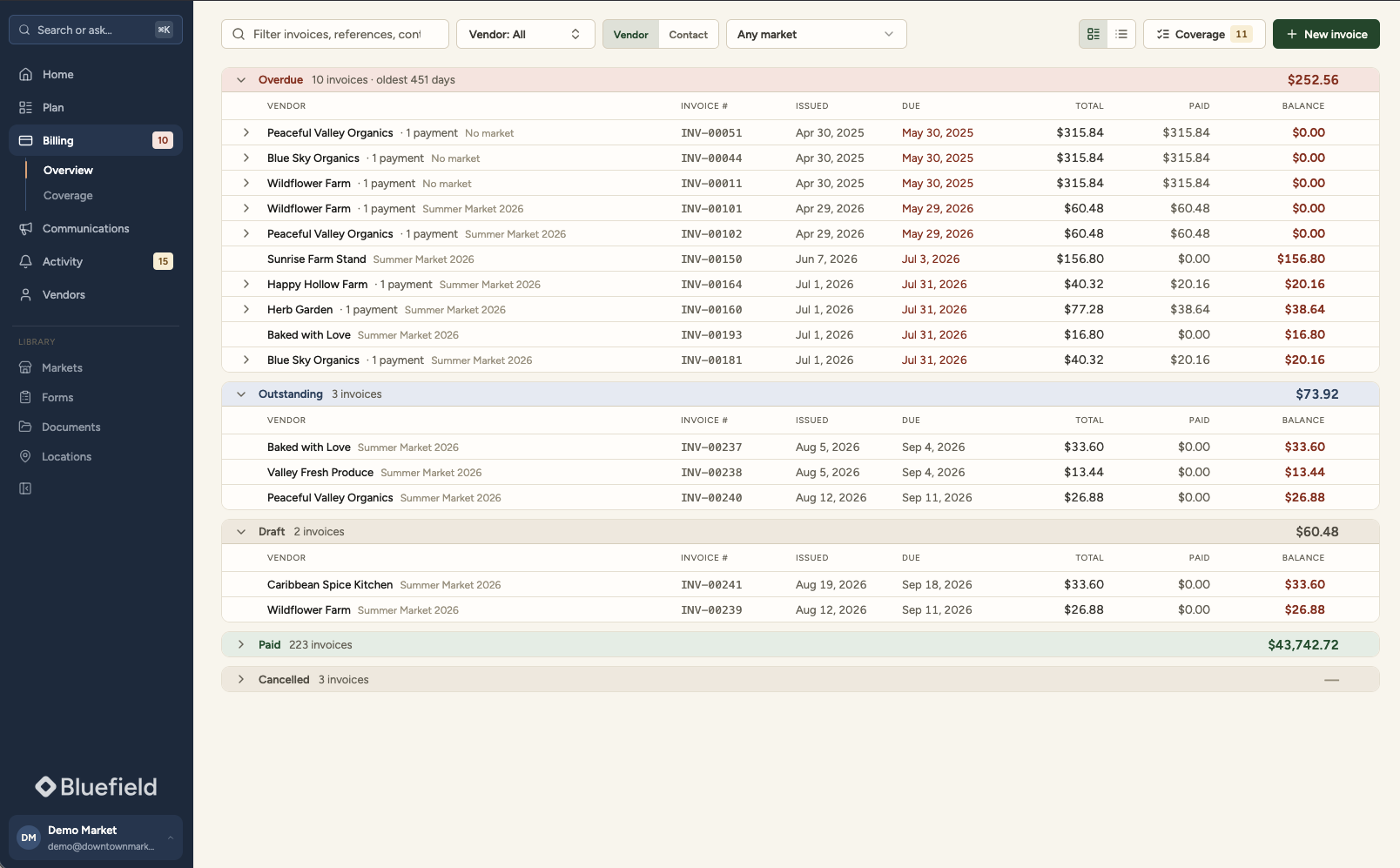
Every booked day is on an invoice or visibly not, vendor by vendor. A season cannot quietly go uninvoiced.
Overdue, outstanding and draft, with the oldest named. The chasing list comes off the invoices themselves.
Built with accounting and bookkeeping firms, so your bookkeeper never re-keys an export. Year end is a review, not a reconstruction.
If your organization files a return and answers to a board, the question is whether the year closes without a week of manual matching. That is the part we built properly.
One vendor, everything about them
Markets, forms, booked days, documents, invoices, payments and the full history, on one page. The answer to “didn’t she pay in May?” takes seconds.
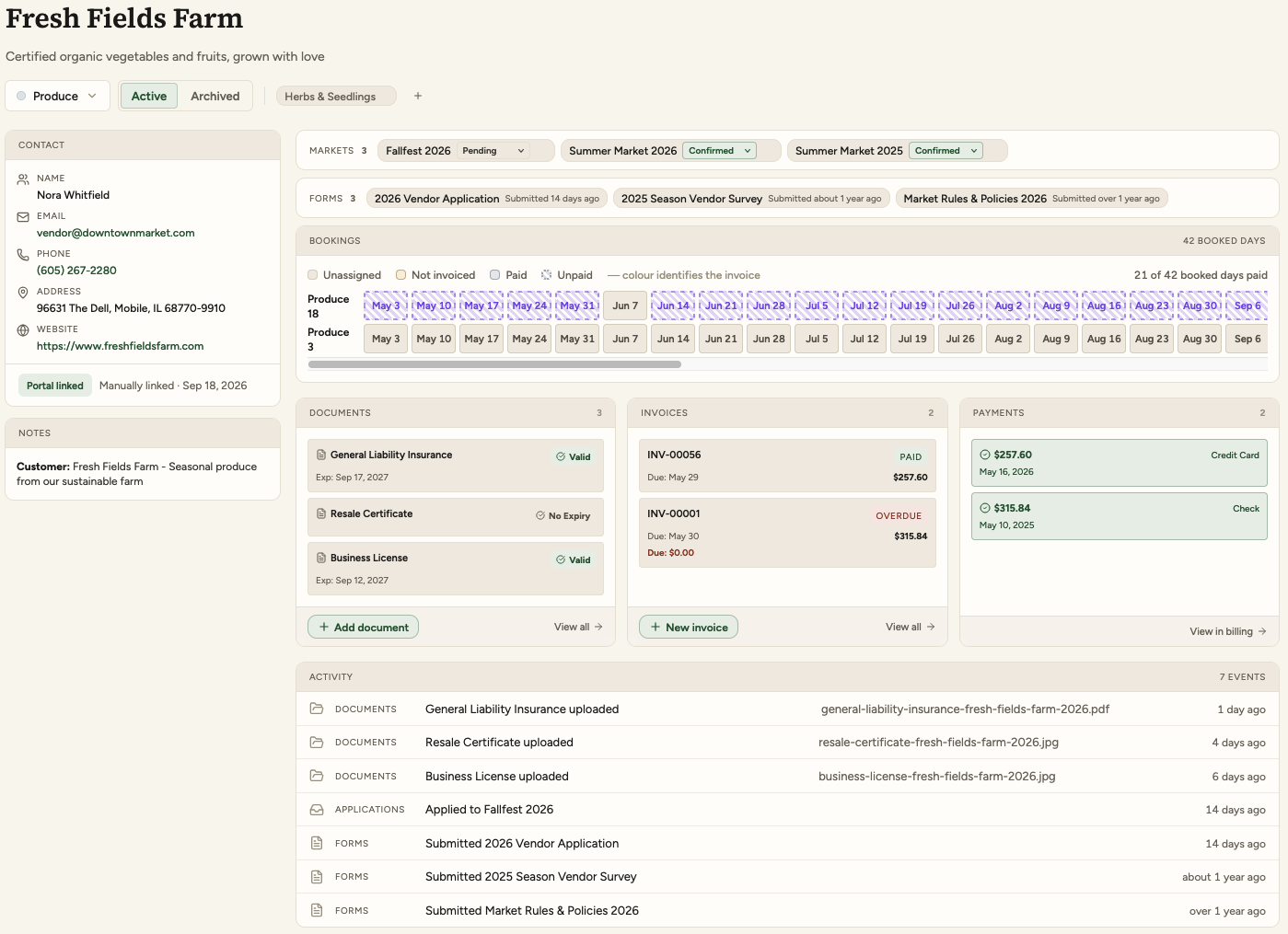
A vendor who trades at two of your markets is one vendor, with one history.
The answers on their application are the tags you filter the directory by. Everyone who sells preserves, in one click.
All vendors, one market, or one market day. Write it, publish it, and it is in their portal and their inbox.
Who submitted what, who uploaded what, who registered, in order, so a question about April has an answer in April.

Free for vendors, and the reason your inbox empties
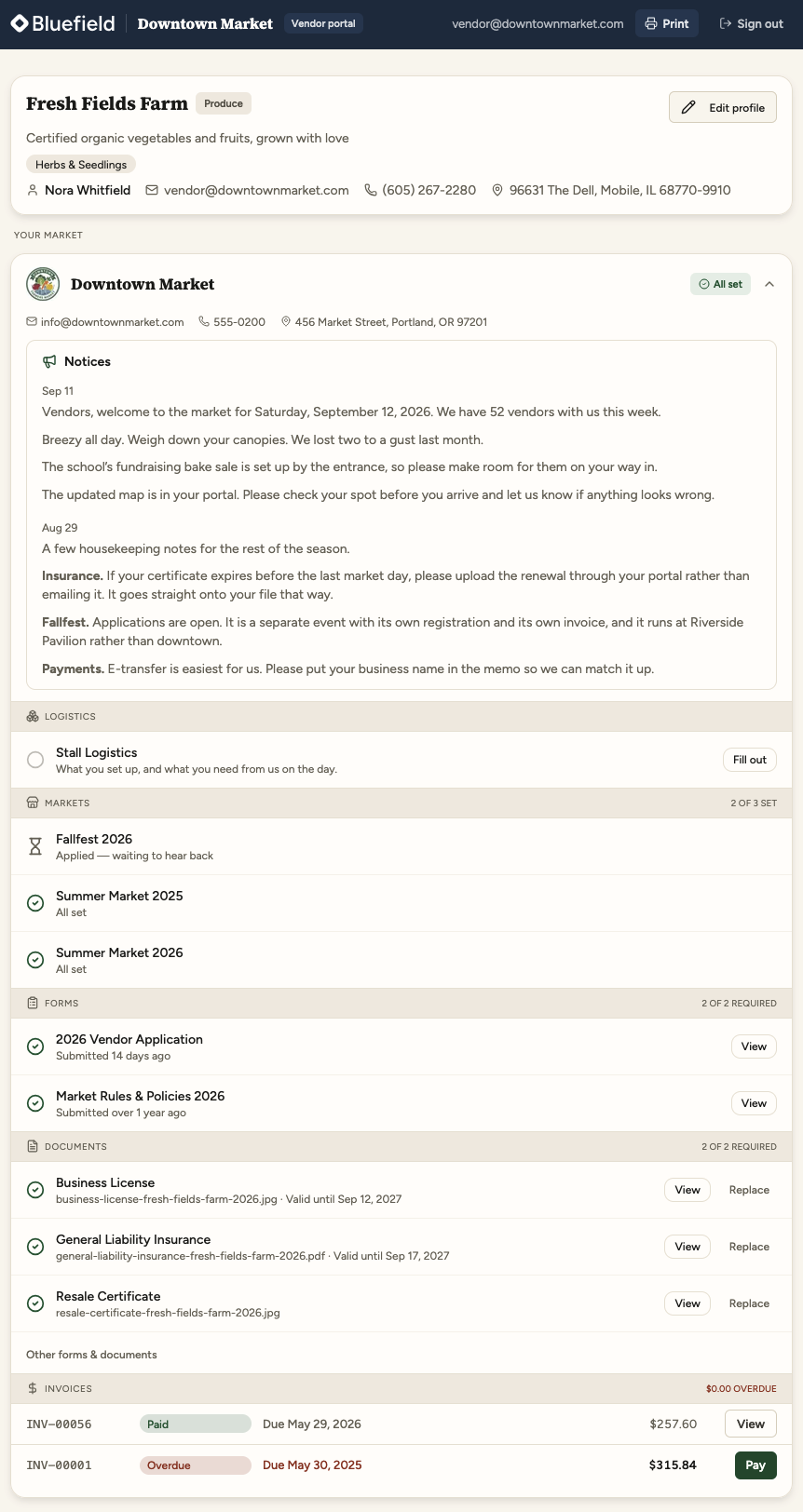
The half of the system your vendors use. They are not the customer here: they are the reason the record stays current without anybody chasing it.
They apply, you decide
The application arrives complete, with the documents attached, and an accepted vendor is on the roster with nothing to retype.
They keep their own file current
A renewed certificate goes straight onto their record, with its new expiry date. Chasing a certificate stops being the manager’s job.
It costs them nothing, and always will
Vendors are never billed for the portal, so nobody has to be talked into using it. It is how they apply, how they upload a renewal, and how they find out where they are standing on Saturday.

See it against your own market
Half an hour, no obligation, and you talk to the people who build it. Bring your worst spreadsheet and the question you have never been able to answer quickly.